Built for the agentic computer

Control your Mac agents from iPhone.Approve, interrupt, resume, and launch.

TraceFence Standard turns iPhone into a local control surface for Mac agents. Approve requests, launch or resume sessions, interrupt unsafe runs, and supervise Codex Desktop, Claude Code, Cursor, Gemini CLI, Grok, Qwen, OpenCode, MiniMax, OpenClaw, and more from your phone.

Start with the GitHub local build, pair TraceFence Sentinel on iPhone, then unlock Standard for remote agent control. GitHub Releases receive feature updates and bug fixes faster; the App Store build remains available for store-signed installation.
iPhone control Mac agents Approvals launch, resume, interrupt Local-first private by default
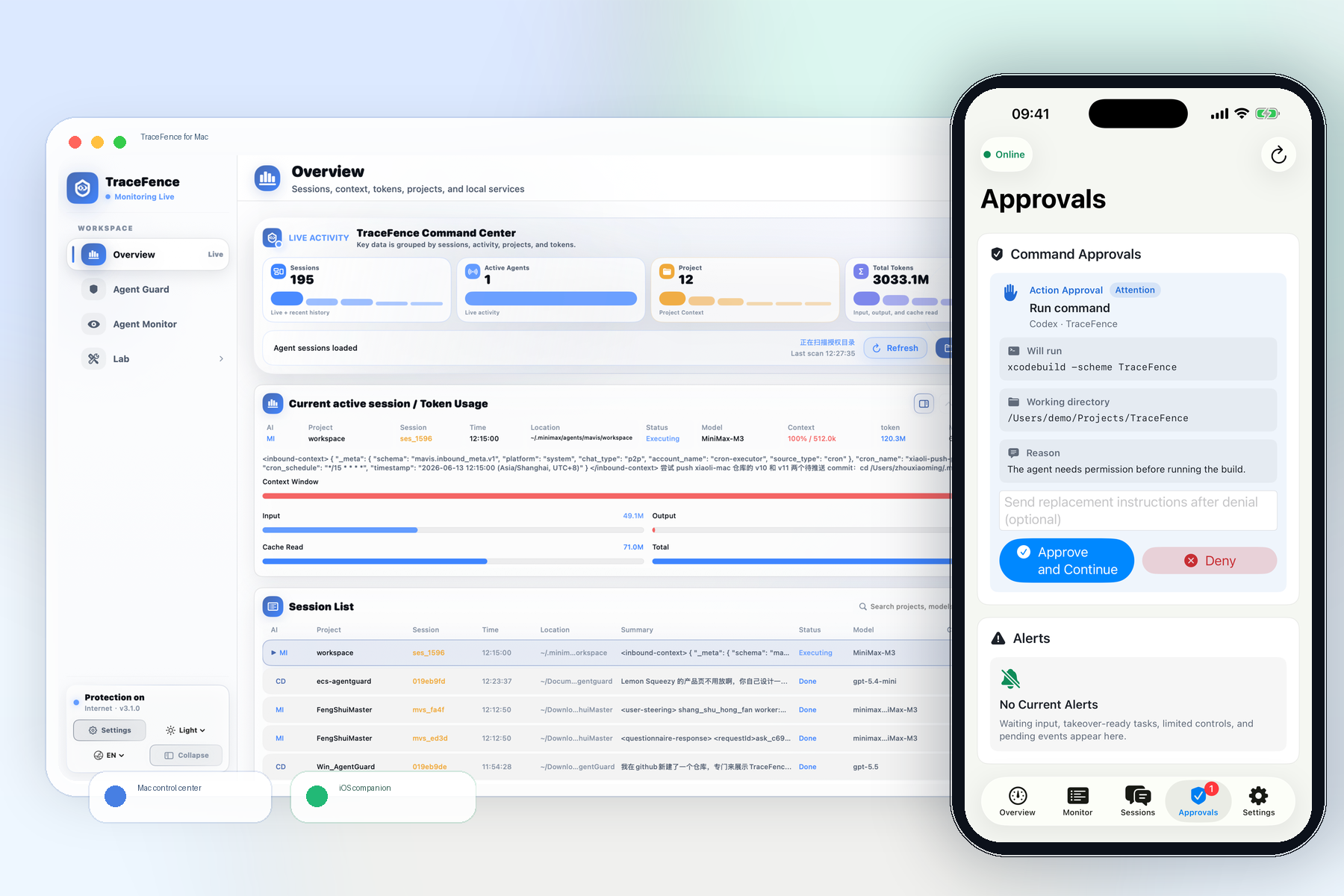
TraceFence Mac control center paired with the iOS companion app for approvals, alerts, and mobile agent monitoring
Mac Agent CoreSessions · approvals · controlLive
iOSTraceFence SentinelApprove, resume, interrupt
Simple pricing

See the price at a glance,
then let the value do the talking.

TraceFence Standard is a subscription for iPhone-controlled Mac agent workflows. Choose monthly while testing remote approvals, launches, and interrupts; choose annual when Sentinel becomes part of your daily agent control loop.

TraceFence Standard Monthly or annual subscription
Monthly US$9.99 per month
Annual US$79.99 per year · best value

Subscribe to unlock TraceFence Standard across iPhone remote control, approvals, session launch and resume, interrupt controls, TokenScope analytics, and Agent Guard audit.

iPhone control for Mac agents Approve, launch, resume, interrupt Codex, Claude, Cursor, Gemini, Grok, Qwen and more macOS + TraceFence Sentinel + GitHub Releases
iOS TestFlight client

Run Mac agents
from your iPhone.

TraceFence Sentinel is available through TestFlight. Pair it with your Mac to approve waiting requests, launch or relaunch CLI sessions, interrupt unsafe runs, resume paused work, and monitor supported agents from iPhone.

Approve from iPhone Launch, resume, interrupt No TraceFence cloud relay
iOSJoin iOS TestFlight

iPhone control for supported Mac agents

Codex DesktopClaude CodeCursor AgentGemini CLIGrok CLIQwen CodeOpenCodeMiniMax CodeOpenClawHermes AgentKiro CLIAiderAmpGooseCopilot CLIFactory / DroidCodeBuddyTrae
Approve. Steer. Protect.

When agents are running,
your iPhone becomes the control room.

TraceFence Standard connects TraceFence Sentinel on iPhone to Agent Core on your Mac, so approvals, session launches, interrupts, resumes, context, TokenScope usage, and Agent Guard audit stay in one local-first workflow.

Live overview

Control supported agents from iPhone

Approve permission requests, answer waiting questions, launch or relaunch CLI sessions, interrupt unsafe runs, resume paused work, and terminate controllable sessions when the adapter exposes a real control path.

TraceFence live sessions and agent control overview
Sentinel follows the Mac response: controllable sessions get action buttons, display-only sessions stay read-only.
Approvals

Keep permission gates moving

Codex, Claude Code, Gemini, Grok, Qwen, OpenCode, and MiniMax can surface approval paths where their CLI or hook supports it, so a waiting agent can continue after your iPhone decision.

Approve permission request!Interrupt unsafe runResume paused session
Agent Core

No fake buttons for read-only agents

TraceFence negotiates capability per adapter. CodeBuddy and Trae can be monitored when only local indexes are available, while controllable CLI sessions expose launch, relaunch, interrupt, resume, or terminate actions.

18Adapter manifests
iOS
Local-first privacy

Local first, without handing over private chats.

TraceFence primarily reads authorized folders, local logs, metadata, and system capabilities. Private conversation content stays local by default.

Your MacPrivate by default
Agent logsProcessesFile metadataUsage windows
A calmer control loop

Not another chat window.
A remote control for your agents.

Pair iPhone with your Mac, choose a supported agent session, approve or deny requests, and interrupt, resume, launch, or relaunch work without routing your agent data through TraceFence cloud.

View TraceFence on the Mac App Store
  1. 01
    Pair Mac and iPhone

    Enable the local control API on Mac, import the pairing code into TraceFence Sentinel, and connect over LAN, Tailscale, VPN, or your own tunnel.

  2. 02
    Pick a supported agent

    Agent Core discovers adapters for Codex Desktop, Claude Code, Cursor, Gemini, Grok, Qwen, OpenCode, MiniMax, OpenClaw, and more.

  3. 03
    Control the live session

    Approve, deny, launch, relaunch, interrupt, resume, or terminate when the session reports a real local control path.

Privacy by architecture

Your sessions and files stay on your computer.

Local parsing, local cache, user authorization, and on-demand monitoring. TraceFence creates visibility and attribution without collecting private content.

No file-content uploadsNo transparent traffic interceptionRisky actions require confirmationMonitoring can be disabled anytime
Quick answers

Before you download TraceFence

What problem does it solve?

TraceFence Standard turns your iPhone into a local control surface for Mac agents, so you can approve requests, launch or resume sessions, interrupt unsafe runs, and monitor agent context from away from the keyboard.

How much does Standard cost?

TraceFence Standard is subscription-based: US$9.99 per month or US$79.99 per year. Start with the GitHub local build for faster feature updates and bug fixes; the App Store build remains available for store-signed installation.

What is included in Standard?

Standard includes iPhone remote control, approvals, launch and relaunch, interrupt, resume, terminate, agent session context, TokenScope analytics, Agent Guard audit, and local-first privacy controls.

Which agents are supported?

Agent Core includes adapters for Codex Desktop, Claude Code, Cursor Agent, Gemini CLI, Grok CLI, Qwen Code, OpenCode, MiniMax Code, OpenClaw, Hermes, Kiro, Aider, Amp, Goose, Copilot CLI, Factory/Droid, CodeBuddy, and Trae. Control depth depends on local adapter support.

Is there an iOS client?

Yes. TraceFence Sentinel is available through TestFlight and connects directly to the paired Mac. There is no TraceFence cloud relay; use LAN, Tailscale, VPN, or your own tunnel for remote access.

Is it private?

TraceFence is local-first. It reads authorized folders, local logs, metadata, and system signals, while private file contents stay on your device by default.

TraceFence Standard subscription · macOS app · iOS TestFlight · GitHub Releases

Give your AI agents
a real security command center.

GitHub local buildFast updates and fixes Download